
Metals & Alloys
Supporting Metal Alloy Design with BIOVIA Materials Studio
In Silico Metal & Alloy Design
Pure metals are generally too soft for demanding industrial applications. They may instead be combined with other metals to create more durable alloy compounds. Materials Studio can be used to design new alloys in silico to meet specific performance criteria and to predict their highly complex phase behavior. This is of particular importance when designing new materials for use in additive manufacturing. The microstructure formed during the solidification process in the flat bed sintering is very sensitive to the specific conditions of the powder bed. The microstructure in turn has a strong influence on the performance of the printed part. In silico methods allow researchers to explore the enormous chemical space to identify novel high-performance alloys and understand the performance of existing ones.
A Powerful Combination
BIOVIA Materials Studio in combination with BIOVIA Pipeline Pilot provides a variety of methods to identify stable multicomponent alloy compositions and predict their corresponding material properties.
- Fit CALPHAD databases and produce:
- Phase diagrams
- Solidification using phase field simulations
- Calculate properties needed by SIMULIA and other Dassault Systèmes tools to run simulations such as homogenization of Representative Volume Element (RVE) models
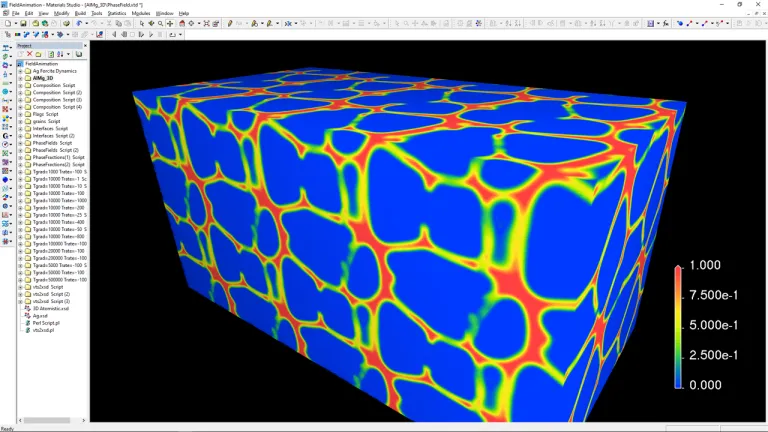
- Alloys
- Additive Manufacturing
Alloys
- Propose stable lattice structures for multicomponent alloys based on their composition
- Calculate material properties for the alloys based in quantum mechanical methods in CASTEP, such as mechanical and elastic properties; elastic coefficients, elastic moduli; thermal properties, thermal conductivity, thermal expansion, heat capacity; electrical properties, magnetic moment
- Assess the molecular interactions between alloy surfaces and coatings
- Construct cluster expansions for multicomponent alloys and calculate properties to screen a large variety of alloy configurations
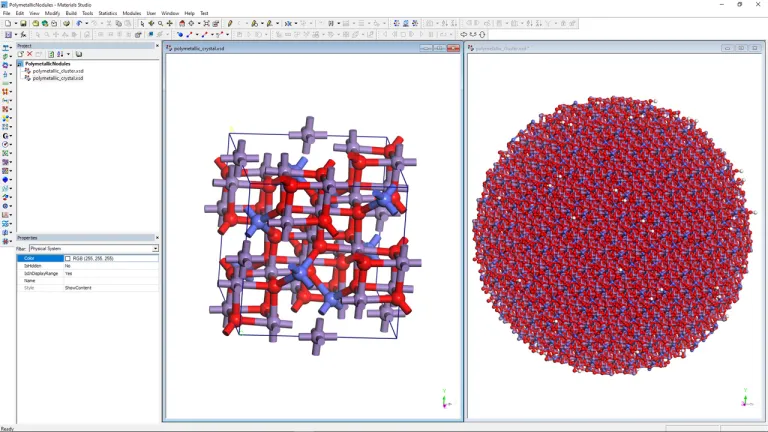
Additive Manufacturing
- Predict energetic favorability of disordered alloy formation based on composition
- Determine thermal conductivity and thermal expansion, which may be used to understand the material behavior during selective laser melting and subsequent cooling process to assess material usability for additive manufacturing
Explore Our Methods
The world of Metals & Alloys is changing. Discover how to stay a step ahead with BIOVIA
Join the conversation in the BIOVIA Materials Studio User Community!
What if your research could scale with the computing power it needs?Join BIOVIA scientists to explore how AI-powered cloud modeling can help academic researchers tackle more ambitious science.What we’ll cover:Access on-demand HPC, including powerful CPUs and GPUsBenefit from frequent scientific releases throughout the yearStudy proteins and small molecules with AI models and validated physic
BIOVIA MATERIALS STUDIO
I am using BIOVIA Materials Studio (Forcite MD) to analyze a vapor/liquid system, where the liquid layer is in the middle of the cell. I want to calculate a density profile along the z-axis using the Concentration profiles in Forcite --> analysis. However, the liquid layer is moved along z-axis during MD runs, so the concentration cannot be calculated correctly. My question is how to remove such
BIOVIA MATERIALS STUDIO
BIOVIA TURBOMOLE 2026 HF1 was released in April 2026 and is available for download at https://software.3ds.com under BIOVIA products:Product line: Lab, Scientific and Content SolutionsRelease: 2026Level: BIOVIA 2026 GoldenFixes for this level: BIOVIA 2026 Golden HF3The following Technical Note informs you about BIOVIA TURBOMOLE 2026 HF1 including the release's supported operating systems, enhance
BIOVIA MATERIALS STUDIO
Also Discover
An Integrated, Multi-scale Modeling Environment

Foster Innovation with In Silico Design
Driving the Design of Advanced Composites and Polymers

Empowering Chemical & Catalyst R&D with BIOVIA Materials Studio

Characterizing the Foundation of Electronic Properties
Empowering the Virtual Design of Battery Materials and Fuel Cells

Driving the Virtual Design of Photovoltaics and Organic Electronics

Speeding up CPG R&D

Accelerating Pharmaceutical Development

Learn What BIOVIA Can Do for You
Speak with a BIOVIA expert to learn how our solutions enable seamless collaboration and sustainable innovation at organizations of every size.
Get Started
Courses and classes are available for students, academia, professionals and companies. Find the right BIOVIA training for you.
Get Help
Find information on software & hardware certification, software downloads, user documentation, support contact and services offering