
Model Design Tools
Supporting Parameter Sweeps, Model Calibration, Design Optimization & Advanced Model Management
Get an Overview about the Design Tools for DYMOLA
Model experimentation involves running simulations for various combinations of parameters to determine the modeled system’s properties. Model calibration helps user to tune parameters such that the simulation results are in good agreement with the measured data. Design optimization improve system dynamics for multiple criteria and multiple Use Cases. In general these options helps user to perform simulation effectively and manage the models easily.
Model Exploration and Management in Dymola
Dymola streamlines parameter sweeps, automates model calibration for real-world data, and enhances system performance through design optimization. It also offers robust model management, including encryption and version control.
- Sweeping Parameters
- Design Optimization
- Model Calibration
- Model Management
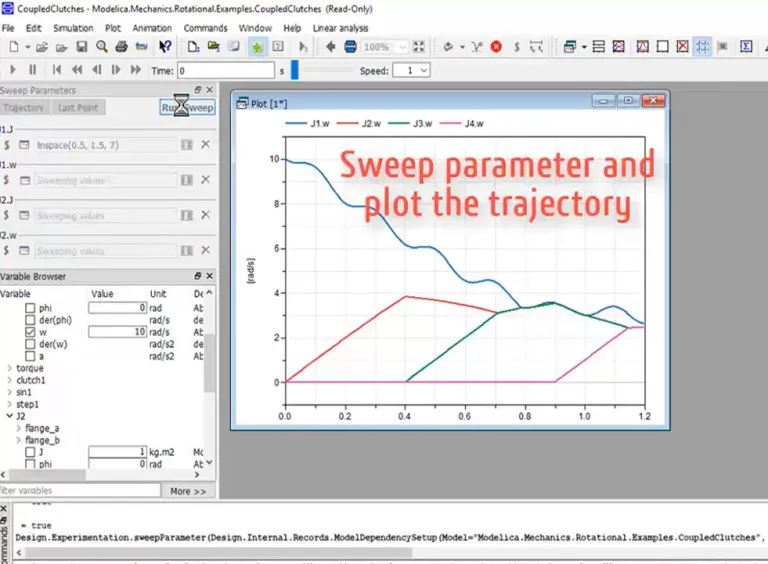
Few models are simulated only once. In fact, running several simulations with different parameters and comparing the results is one of the most fundamental user tasks. This can be done with scripts in Dymola or from Python, or using the built-in functionality.
Dymola has a modern user interface that allows the user to drag-and-drop variables that will be used to sweep and to visualize the results. When sweeping one parameter, you have the choice of plotting the full trajectories or just the points at end of simulation. When sweeping two parameters Dymola will plot a surface from the last points. For three or more parameters, scatter plots are used.
Parameter sweeps automatically run in parallel on all available cores of the computer's processor.
Design Optimization is used to tune parameters of a device or its controller to improve system dynamics for multiple criteria and multiple cases.
A Modelica model contains many parameters that can be tuned for better performance, for example, the spring constants of a car, the gear ratio of a gearbox, or parameters of a controller.
Design optimization is an approach to tune parameters such that the system behavior is improved. The tuning parameters are calculated to minimize mathematical criteria which express improvement. Criteria values are usually derived from simulation results, e.g., the overshoot or rise time of a response, but they can also be derived by frequency responses or eigenvalue analysis.
A Modelica model describing a physical system typically includes many parameters which have to be set. Some parameter values are difficult to determine from the design specification or hard to measure, for example the inertia of a part, friction and loss parameters.
Model calibration (parameter estimation) is the process where measured data from a real device is used to tune parameters such that the simulation results are in good agreement with the measured data. Dymola varies the tuning parameters and simulates to search for satisfactory solutions which minimize the difference between the simulation results and the measurements.
Model Management includes support for encryption of models, version control from Dymola (CVS, Subversion and GIT) and utilities for checking, testing and comparing models.
Integration with version control systems.
Regression testing (checking simulation results against know good results).
Class and condition coverage.
Variable unit and style checking.
Start Your Journey
The world of Systems Engineering is changing. Discover how to stay a step ahead with Dymola.

Free Trial Version of DYMOLA for Windows
The Trial Version has the functionality of DYMOLA standard, but with limited capacity.
Free Trials

Join the conversation in the CATIA MBSE Cyber System User Community!
Cybersecurity DO326A Airworthiness Plugin for CATIA Magic
Advancing Aviation Cybersecurity Through Model-Based Systems EngineeringAs aircraft become increasingly connected, software-intensive, and autonomous, integrating cybersecurity into the engineering lifecycle is more important than ever.Using CATIA Magic and the DO-326A Airworthiness Cybersecurity Plugin, we've developed a reusable eVTOL (electric Vertical Take-Off and Landing) example model that d
CATIA MBSE CYBER SYSTEMS
How to set HTML checkbox by default for Documentation
I'm using CSM 2024 R2 HF1When I add documentation for a model element, I have to click the HTML box as that is my preferred way of documenting since I copy/paste a lot of content from various resources.Is there a setting I can enable such that the documentation pane is by default in HTML mode and I don't have to click it each time?Thank you!
CATIA MBSE CYBER SYSTEMS
20 Million Euros saved within two weeks
I had to share the story of this incredible service provided to one of our clients: 20 Million Euros saved in two weeks work with STIMULUS:
CATIA MBSE CYBER SYSTEMS
UCODS - SE Commission - Webinar Making a first MBSE application proves something
The SE Commision of UCODS is pleased is pleased to announce its next webinar : "Making a first MBSE application proves something" which will take place on November 18, 2026 at 11:00 a.m. (French Time) Register at the following link:https://www.ucods.eu/event/making-a-first-mbse-application-proves-something-58/register?utm_source=Webinar+UCODS+Novemb%2E%2E%2E+%28E-mail+Marketing+cr%C3%A9%C3%A9
CATIA MBSE CYBER SYSTEMS
Also Discover
Export Capabilities & Interfacing with Other Software
Dymola Supports FMI (Functional Mockup Interface), Code & Model Exports to other Platforms, and offers interfaces to other software.

Dymola
Multi-Engineering Modeling and Simulation based on Modelica and FMI

Dymola Industry Solutions
Model and simulate complex systems that can span multiple engineering disciplines with Modelica specialized libraries and the 3DEXPERIENCE platform

Systems Engineering
End-to-End Model-Based Solutions for Mechatronics & Software-Driven Experiences
Learn What CATIA Can Do for You
Speak with a CATIA expert to learn how our solutions enable seamless collaboration and sustainable innovation at organizations of every size.
Get Started
Courses and classes are available for students, academia, professionals and companies. Find the right CATIA training for you.
Get Help
Find information on software & hardware certification, software downloads, user documentation, support contact and services offering